
diff options
| -rw-r--r-- | tutorials/1_06_arrays.md | 95 | ||||
| -rw-r--r-- | tutorials/1_07_control_structures.md | 122 |
2 files changed, 212 insertions, 5 deletions
diff --git a/tutorials/1_06_arrays.md b/tutorials/1_06_arrays.md index 76dd1ee..c8f2452 100644 --- a/tutorials/1_06_arrays.md +++ b/tutorials/1_06_arrays.md @@ -12,11 +12,15 @@ A two-dimensional array would be like a table: | 8 | 3 | 6 | 1 | | 1 | 7 | 2 | 9 | -A three-dimensional array would be like a set of tables, perhaps stacked as though they were printed on separate pages. +A three-dimensional array would be like a set of tables, perhaps stacked as though they were printed on separate pages. If we visualize the position of each element as a position in space. Then we can represent the value of the element as a property. In other words, if we were to analyze the stress concentration of an aluminum block, the property would be stress. - From [Numpy documentation](https://numpy.org/doc/2.2/user/absolute_beginners.html) +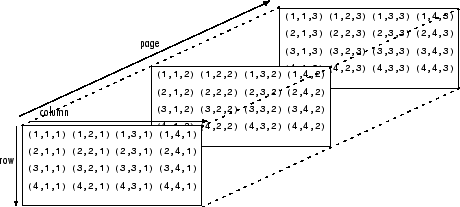 + +If the load on this block changes over time, then we may want to add a 4th dimension i.e. additional sets of 3-D arrays for each time increment. As you can see - the more dimensions we add, the more complicated of a problem we have to solve. It is possible to increase the number of dimensions to the n-th order. This course we will not be going beyond dimensional analysis. --- +# Numpy - the python's array library In this tutorial we will be introducing arrays and we will be using the numpy library. Arrays, lists, vectors, matrices, sets - You might've heard of them before, they all store data. In programming, an array is a variable that can hold more than one value at a time. We will be using the Numpy python library to create arrays. Since we already have installed Numpy previously, we can start using the package. @@ -30,6 +34,7 @@ import numpy as np - `import` - calls for a library to use, in our case it is Numpy. - `as` - gives the library an alias in your script. It's common convention in Python programming to make the code shorter and more readable. We will be using *np* as it's a standard using in many projects. +--- # Creating arrays Now that we have imported the library we can create a one dimensional array or *vector* with three elements. ```python @@ -48,6 +53,7 @@ matrix = np.array([[1,2,3], *Note: for every array we nest, we get a new dimension in our data structure.* ## Numpy array creation functions +Numpy comes with some built-in function that we can use to create arrays quickly. Here are a couple of functions that are commonly used in python. ### np.arange The `np.arange()` function returns an array with evenly spaced values within a specified range. It is similar to the built-in `range()` function in Python but returns a Numpy array instead of a list. The parameters for this function are the start value (inclusive), the stop value (exclusive), and the step size. If the step size is not provided, it defaults to 1. @@ -74,3 +80,90 @@ Try this and see what happens: x = np.linspace(0,100,101) y = np.sin(x) ``` + +### Other useful functions +- `np.zeros()` +- `np.ones()` +- `np.eye()` + +## Working with Arrays +Now that we have been introduced to some ways to create arrays using the Numpy functions let's start using them. +### Indexing +Indexing in Python allows you to access specific elements within an array based on their position. This means you can directly retrieve and manipulate individual items as needed. + +Python uses **zero-based indexing**, meaning the first element is at position **0** rather than **1**. This approach is common in many programming languages. For example, in a list with five elements, the first element is at index `0`, followed by elements at indices `1`, `2`, `3`, and `4`. + +Here's an example of data from a rocket test stand where thrust was recorded as a function of time. + +```python +thrust_lbf = np.array(0.603355, 2.019083, 2.808092, 4.054973, 1.136618, 0.943668) + +>>> thrust_lbs[3] +``` + +Due to the nature of zero-based indexing. If we want to call the value `4.054973` that will be the 3rd index. +### Operations on arrays +- Arithmetic operations (`+`, `-`, `*`, `/`, `**`) +- `np.add()`, `np.subtract()`, `np.multiply()`, `np.divide()` +- `np.dot()` for dot product +- `np.matmul()` for matrix multiplication +- `np.linalg.inv()`, `np.linalg.det()` for linear algebra +#### Statistics +- `np.mean()`, `np.median()`, `np.std()`, `np.var()` +- `np.min()`, `np.max()`, `np.argmin()`, `np.argmax()` +- Summation along axes: `np.sum(arr, axis=0)` +#### Combining arrays +- Concatenation: `np.concatenate((arr1, arr2), axis=0)` +- Stacking: `np.vstack()`, `np.hstack()` +- Splitting: `np.split()` + +# Exercise +Let's solve a statics problem given the following problem + +A simply supported bridge of length L=20L = 20L=20 m is subjected to three point loads: + +- $P1=10P_1 = 10P1=10 kN$ at $x=5x = 5x=5 m$ +- $P2=15P_2 = 15P2=15 kN$ at $x=10x = 10x=10 m$ +- $P3=20P_3 = 20P3=20 kN$ at $x=15x = 15x=15 m$ + +The bridge is supported by two reaction forces at points AAA (left support) and BBB (right support). We assume the bridge is in static equilibrium, meaning the sum of forces and sum of moments about any point must be zero. + +#### Equilibrium Equations: + +1. **Sum of Forces in the Vertical Direction**: + $RA+RB−P1−P2−P3=0R_A + R_B - P_1 - P_2 - P_3 = 0RA+RB−P1−P2−P3=0$ +2. **Sum of Moments About Point A**: + $5P1+10P2+15P3−20RB=05 P_1 + 10 P_2 + 15 P_3 - 20 R_B = 05P1+10P2+15P3−20RB=0$ +3. **Sum of Moments About Point B**: + $20RA−15P3−10P2−5P1=020 R_A - 15 P_3 - 10 P_2 - 5 P_1 = 020RA−15P3−10P2−5P1=0$ + +#### System of Equations: + +{RA+RB−10−15−20=05(10)+10(15)+15(20)−20RB=020RA−5(10)−10(15)−15(20)=0\begin{cases} R_A + R_B - 10 - 15 - 20 = 0 \\ 5(10) + 10(15) + 15(20) - 20 R_B = 0 \\ 20 R_A - 5(10) - 10(15) - 15(20) = 0 \end{cases}⎩ + + +## Solution +```python +import numpy as np + +# Define the coefficient matrix A +A = np.array([ + [1, 1], + [0, -20], + [20, 0] +]) + +# Define the right-hand side vector b +b = np.array([ + 45, + 5*10 + 10*15 + 15*20, + 5*10 + 10*15 + 15*20 +]) + +# Solve the system of equations Ax = b +x = np.linalg.lstsq(A, b, rcond=None)[0] # Using least squares to handle potential overdetermination + +# Display the results +print(f"Reaction force at A (R_A): {x[0]:.2f} kN") +print(f"Reaction force at B (R_B): {x[1]:.2f} kN") +```
\ No newline at end of file diff --git a/tutorials/1_07_control_structures.md b/tutorials/1_07_control_structures.md index 21826bb..15e97eb 100644 --- a/tutorials/1_07_control_structures.md +++ b/tutorials/1_07_control_structures.md @@ -1,13 +1,127 @@ # Control Structures Control structures allow us to control the flow of execution in a Python program. The two main types are **conditional statements (`if` statements)** and **loops (`for` and `while` loops)**. -## Flowcharts +## Conditional Statements +Conditional statements allow a program to execute different blocks of code depending on whether a given condition is `True` or `False`. These conditions are typically comparisons, such as checking if one number is greater than another. -## Conditional statements -Conditional statements let you execute code based on different conditions using if, elif and else statements. +### The `if` Statement +The simplest form of a conditional statement is the `if` statement. If the condition evaluates to `True`, the indented block of code runs. Otherwise, the program moves on without executing the statement. +For example, consider a situation where we need to determine if a person is an adult based on their age. If the age is 18 or greater, we print a message saying they are an adult. +### The `if-else` Statement -## Loops +Sometimes, we need to specify what should happen if the condition is `False`. The `else` clause allows us to handle this case. Instead of just skipping over the block, the program can execute an alternative action. + +For instance, if a person is younger than 18, they are considered a minor. If the condition of being an adult is not met, the program will print a message indicating that the person is a minor. + +### The `if-elif-else` Statement + +When dealing with multiple conditions, the `if-elif-else` structure is useful. The program evaluates conditions in order, executing the first one that is `True`. If none of the conditions are met, the `else` block runs. + +For example, in a grading system, different score ranges correspond to different letter grades. If a student's score is 90 or higher, they receive an "A". If it's between 80 and 89, they get a "B", and so on. If none of the conditions match, they receive an "F". + +### Nested `if` Statements + +Sometimes, we need to check conditions within other conditions. This is known as **nesting**. For example, if we first determine that a person is an adult, we can then check if they are a student. Based on that information, we print different messages. + + +```python +# Getting user input for the student's score +score = int(input("Enter the student's score (0-100): ")) + +if 0 <= score <= 100: + if score >= 90: + grade = "A" + elif score >= 80: + grade = "B" + elif score >= 70: + grade = "C" + elif score >= 60: + grade = "D" + else: + grade = "F" # Score below 60 is a failing grade + + + if grade == "F": + print("The student has failed.") + retake_eligible = input("Is the student eligible for a retest? (yes/no): ").strip().lower() + + if retake_eligible == "yes": + print("The student is eligible for a retest.") + else: + print("The student has failed the course and must retake it next semester.") + + +``` + +--- + +## Loops in Python + +Loops allow a program to execute a block of code multiple times. This is especially useful for tasks such as processing lists of data, performing repetitive calculations, or automating tasks. + +### The `for` Loop + +A `for` loop iterates over a sequence, such as a list, tuple, string, or a range of numbers. Each iteration assigns the next value in the sequence to a loop variable, which can then be used inside the loop. + +For instance, if we have a list of fruits and want to print each fruit's name, a `for` loop can iterate over the list and display each item. + +Another useful feature of `for` loops is the `range()` function, which generates a sequence of numbers. This is commonly used when we need to repeat an action a specific number of times. For example, iterating from 0 to 4 allows us to print a message five times. + +Additionally, the `enumerate()` function can be used to loop through a list while keeping track of the index of each item. This is useful when both the position and the value in a sequence are needed. + +```python +fruits = ["apple", "banana", "cherry"] +for x in fruits: + print(x) +``` + +```python +for x in range(6): + print(x) +else: + print("Finally finished!") +``` +### The `while` Loop + +Unlike `for` loops, which iterate over a sequence, `while` loops continue running as long as a specified condition remains `True`. This is useful when the number of iterations is not known in advance. + +For example, a countdown timer can be implemented using a `while` loop. The loop will continue decreasing the count until it reaches zero. + +It's important to be careful with `while` loops to avoid infinite loops, which occur when the condition never becomes `False`. To prevent this, ensure that the condition will eventually change during the execution of the loop. + +A `while` loop can also be used to wait for a certain event to occur. For example, in interactive programs, a `while True` loop can keep running until the user provides a valid input, at which point we break out of the loop. + +```python +i = 1 +while i < 6: + print(i) + i += 1 +``` + +--- + +## Loop Control Statements + +Python provides special statements to control the behavior of loops. These can be used to break out of a loop, skip certain iterations, or simply include a placeholder for future code. + +### The `break` Statement + +The `break` statement is used to exit a loop before it has iterated through all its elements. When the `break` statement is encountered, the loop stops immediately, and the program continues executing the next statement outside the loop. + +For instance, if we are searching for a specific value in a list, we can use a `break` statement to stop the loop as soon as we find the item, instead of continuing unnecessary iterations. + +### The `continue` Statement + +The `continue` statement is used to skip the current iteration and proceed to the next one. Instead of exiting the loop entirely, it simply moves on to the next cycle. + +For example, if we are iterating over numbers and want to skip processing number 2, we can use `continue`. The loop will ignore that iteration and proceed with the next number. + +### The `pass` Statement + +The `pass` statement is a placeholder that does nothing. It is useful when a block of code is syntactically required but no action needs to be performed yet. + +For example, in a loop where a condition has not yet been implemented, using `pass` ensures that the code remains valid while avoiding errors. |