
diff options
Diffstat (limited to 'tutorials')
| -rw-r--r-- | tutorials/1_04_spyder_getting_started.md | 27 | ||||
| -rw-r--r-- | tutorials/module_1/1_01_intro_to_programming.md (renamed from tutorials/1_01_intro_to_programming.md) | 2 | ||||
| -rw-r--r-- | tutorials/module_1/1_02_installing_anaconda.md (renamed from tutorials/1_02_installing_anaconda.md) | 0 | ||||
| -rw-r--r-- | tutorials/module_1/1_03_intro_to_anaconda.md (renamed from tutorials/1_03_intro_to_anaconda.md) | 0 | ||||
| -rw-r--r-- | tutorials/module_1/1_04_spyder_getting_started.md | 41 | ||||
| -rw-r--r-- | tutorials/module_1/1_05_basics_of_python.md (renamed from tutorials/1_05_basics_of_python.md) | 0 | ||||
| -rw-r--r-- | tutorials/module_1/1_06_array.md (renamed from tutorials/1_06_arrays.md) | 0 | ||||
| -rw-r--r-- | tutorials/module_1/1_07_control_structures.md (renamed from tutorials/1_07_control_structures.md) | 0 | ||||
| -rw-r--r-- | tutorials/module_1/1_classes_and_objects.md (renamed from tutorials/1_classes_and_objects.md) | 0 | ||||
| -rw-r--r-- | tutorials/module_1/1_computational_expense.md (renamed from tutorials/1_computational_expense.md) | 0 | ||||
| -rw-r--r-- | tutorials/module_1/1_computing_fundamentals.md (renamed from tutorials/1_computing_fundamentals.md) | 0 | ||||
| -rw-r--r-- | tutorials/module_1/1_functions.md (renamed from tutorials/1_functions.md) | 0 | ||||
| -rw-r--r-- | tutorials/module_1/1_fundamentals_of_programming.md (renamed from tutorials/1_fundamentals_of_programming.md) | 0 | ||||
| -rw-r--r-- | tutorials/module_1/1_open_source_software.md (renamed from tutorials/1_open_source_software.md) | 0 | ||||
| -rw-r--r-- | tutorials/module_2/2_01_intro_to_numerical_methods.md (renamed from tutorials/2_01_intro_to_numerical_methods.md) | 0 | ||||
| -rw-r--r-- | tutorials/module_2/2_ai_assisted_programming.md (renamed from tutorials/2_ai_assisted_programming.md) | 0 | ||||
| -rw-r--r-- | tutorials/module_2/2_version_control.md (renamed from tutorials/2_version_control.md) | 0 | ||||
| -rw-r--r-- | tutorials/readme.md | 30 |
18 files changed, 57 insertions, 43 deletions
diff --git a/tutorials/1_04_spyder_getting_started.md b/tutorials/1_04_spyder_getting_started.md deleted file mode 100644 index df141bf..0000000 --- a/tutorials/1_04_spyder_getting_started.md +++ /dev/null @@ -1,27 +0,0 @@ -# Getting started with Spyder - -In this tutorial we will cover the basics of using the Spyder IDE (Interactive Development Environment). If you've ever worked with MATLAB before, then this will feel familiar. Spyder is a program that allows you to write, run and de-bug code. - - -## Launching Spyder -Using Anaconda we will select the environment we created earlier *spyder-dev*. - - -## Spyder Interface - -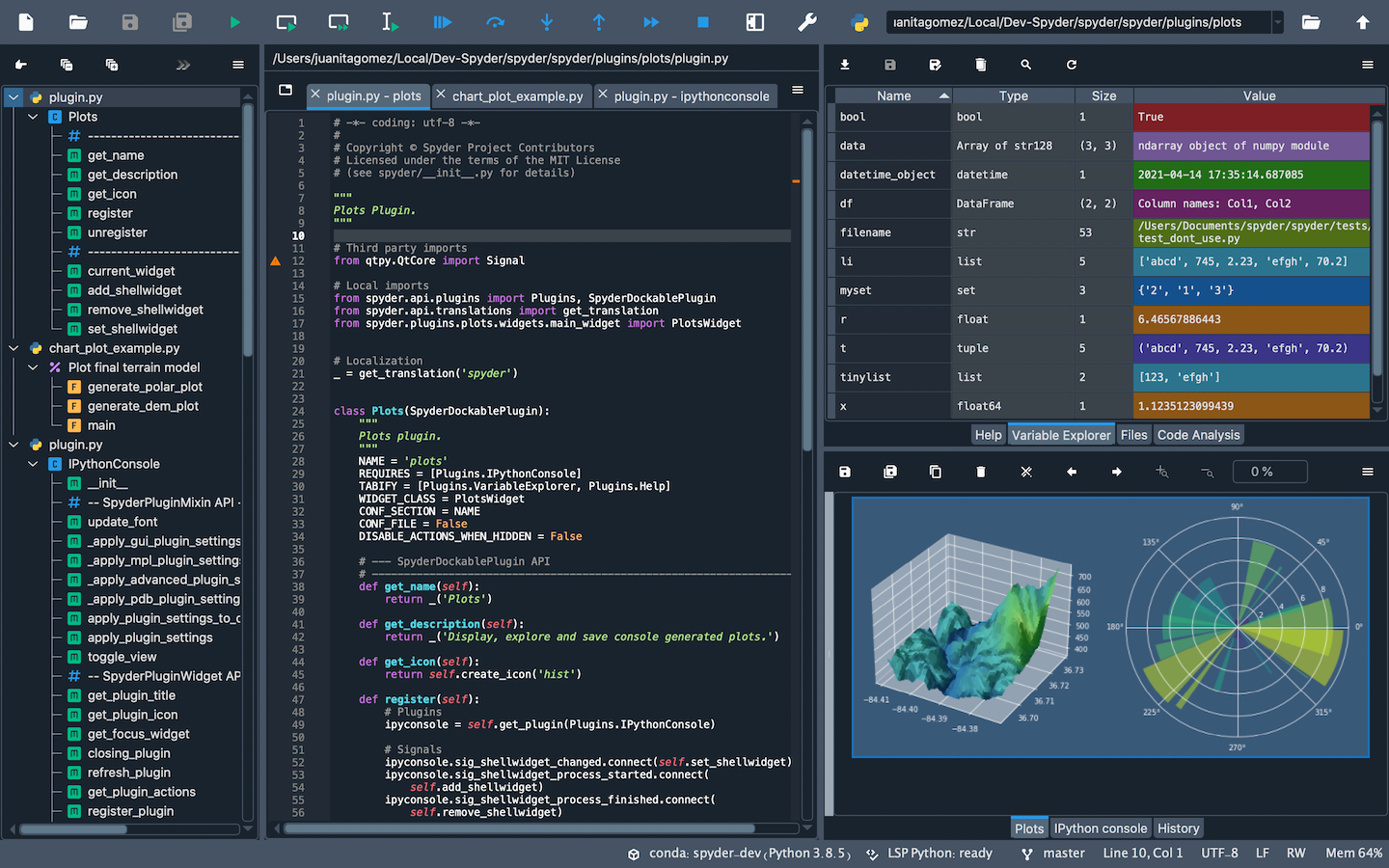 - -Once you open up Spyder in it's default configuration, you'll see three sections; the editor IPython Console, Help viewer. You can customize the interface to suit your prefference and needs some of which include, rearrange, undock, hide panes. Feel free to set up Spyder as you like. - -### Editor -This pane is used to write and save scripts. - - -### IPython Console -This pane allows you to run commands, functions, do math computations and assign variables. - -### Variable Explorer -This pane shows all the variables stored once you've - -### Help Viewer - diff --git a/tutorials/1_01_intro_to_programming.md b/tutorials/module_1/1_01_intro_to_programming.md index 1772ebf..2f12a3a 100644 --- a/tutorials/1_01_intro_to_programming.md +++ b/tutorials/module_1/1_01_intro_to_programming.md @@ -12,4 +12,4 @@ With programming, mechanical engineers can: - **Analyze data:** Process thousands of test results to improve designs. - **Control machines:** Program robots, 3D printers, and CNC's. -In this course, you’ll see how computing and programming applies to mechanical engineering and how they can make you a better problem solver. By the end, you’ll have the skills and understanding of how to write programs that help you **think like an engineer in the digital age.**
\ No newline at end of file +In this course, you’ll see how computing and programming applies to mechanical engineering and how they can make you a better problem solver. By the end, you’ll have the skills and understanding of how to write programs that help you **think like an engineer in the digital age.** diff --git a/tutorials/1_02_installing_anaconda.md b/tutorials/module_1/1_02_installing_anaconda.md index baa4d71..baa4d71 100644 --- a/tutorials/1_02_installing_anaconda.md +++ b/tutorials/module_1/1_02_installing_anaconda.md diff --git a/tutorials/1_03_intro_to_anaconda.md b/tutorials/module_1/1_03_intro_to_anaconda.md index 543239e..543239e 100644 --- a/tutorials/1_03_intro_to_anaconda.md +++ b/tutorials/module_1/1_03_intro_to_anaconda.md diff --git a/tutorials/module_1/1_04_spyder_getting_started.md b/tutorials/module_1/1_04_spyder_getting_started.md new file mode 100644 index 0000000..ba055d7 --- /dev/null +++ b/tutorials/module_1/1_04_spyder_getting_started.md @@ -0,0 +1,41 @@ +# Getting started with Spyder + +In this tutorial we will cover the basics of using the Spyder IDE (Interactive Development Environment). If you've ever worked with MATLAB before, then this will feel familiar. Spyder is a program that allows you to write, run and de-bug code. + +## Launching Spyder +Using Anaconda we will select the environment we created earlier *spyder-dev* and then we can launch spyder from the Home page. + +## Spyder Interface + + + +Once you open up Spyder in it's default configuration, you'll see three sections; the editor IPython Console, Help viewer. You can customize the interface to suit your prefference and needs some of which include, rearrange, undock, hide panes. Feel free to set up Spyder as you like. + +### Editor +This pane is used to write your scripts. The + +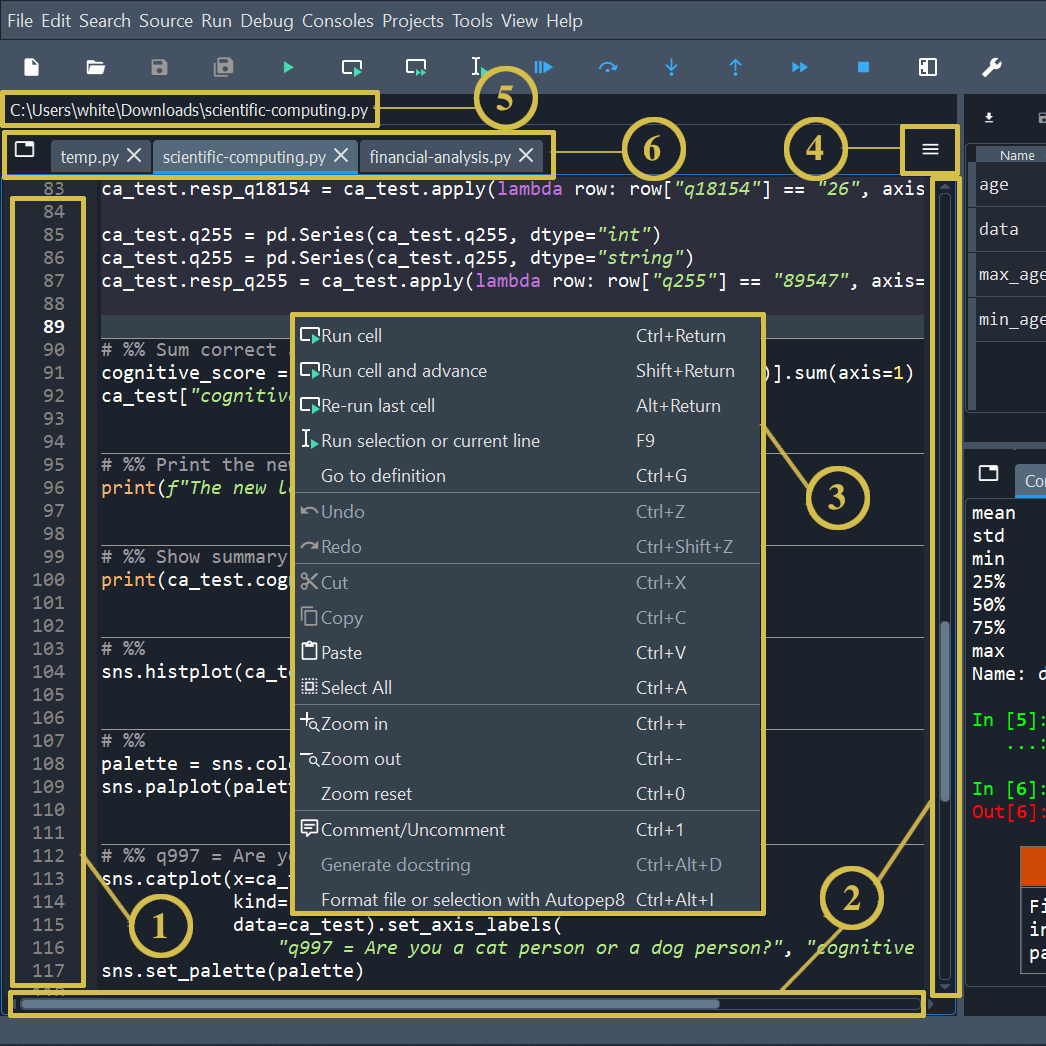 + +1. The left sidebar shows line numbers and displays any code analysis warnings that exist in the current file. Clicking a line number selects the text on that line, and clicking to the right of it sets a [breakpoint](https://docs.spyder-ide.org/5/panes/debugging.html#debugging-breakpoints). +2. The scrollbars allow vertical and horizontal navigation in a file. +3. The context (right-click) menu displays actions relevant to whatever was clicked. +4. The options menu (“Hamburger” icon at top right) includes useful settings and actions relevant to the Editor. +5. The location bar at the top of the Editor pane shows the full path of the current file. +6. The tab bar displays the names of all opened files. It also has a Browse tabs button (at left) to show every open tab and switch between them—which comes in handy if many are open. + +### IPython Console +This pane allows you to interactively run functions, do math computations, assign and modify variables. + +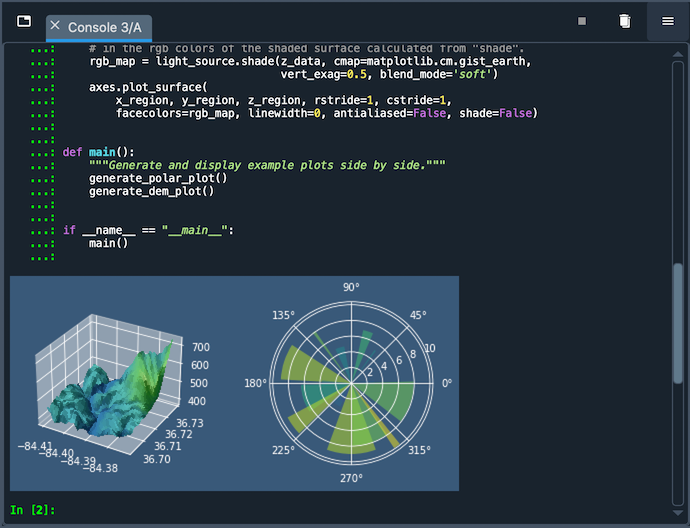 + +- Automatic code completion +- Real-time function calltips +- Full GUI integration with the enhanced Spyder [Debugger](https://docs.spyder-ide.org/5/panes/debugging.html). +- The [Variable Explorer](https://docs.spyder-ide.org/5/panes/variableexplorer.html), with GUI-based editors for many built-in and third-party Python objects. +- Display of Matplotlib graphics in Spyder’s [Plots](https://docs.spyder-ide.org/5/panes/plots.html) pane, if the Inline backend is selected under Preferences ‣ IPython console ‣ Graphics ‣ Graphics backend, and inline in the console if Mute inline plotting is unchecked under the Plots pane’s options menu. + +### Variable Explorer +This pane shows all the defined variables (objects) stored. This can be used to identify the data type of variables, the size and inspect larger arrays. Double clicking the value cell opens up a window which allowing you to inspect the data in a spreadsheet like view. + +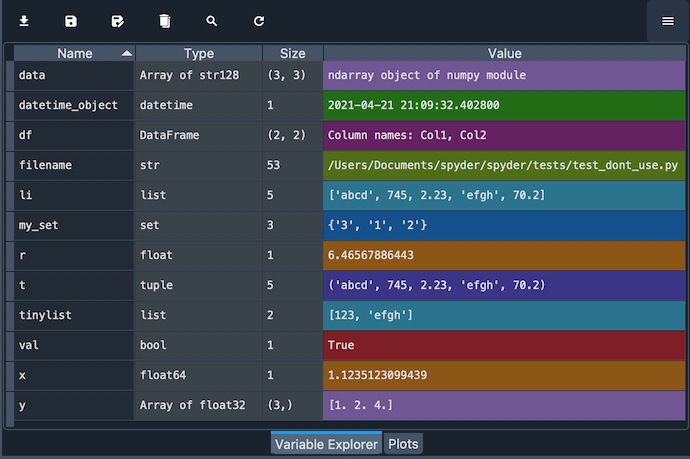 + diff --git a/tutorials/1_05_basics_of_python.md b/tutorials/module_1/1_05_basics_of_python.md index 5cc9aee..5cc9aee 100644 --- a/tutorials/1_05_basics_of_python.md +++ b/tutorials/module_1/1_05_basics_of_python.md diff --git a/tutorials/1_06_arrays.md b/tutorials/module_1/1_06_array.md index c8f2452..c8f2452 100644 --- a/tutorials/1_06_arrays.md +++ b/tutorials/module_1/1_06_array.md diff --git a/tutorials/1_07_control_structures.md b/tutorials/module_1/1_07_control_structures.md index 15e97eb..15e97eb 100644 --- a/tutorials/1_07_control_structures.md +++ b/tutorials/module_1/1_07_control_structures.md diff --git a/tutorials/1_classes_and_objects.md b/tutorials/module_1/1_classes_and_objects.md index 0392483..0392483 100644 --- a/tutorials/1_classes_and_objects.md +++ b/tutorials/module_1/1_classes_and_objects.md diff --git a/tutorials/1_computational_expense.md b/tutorials/module_1/1_computational_expense.md index c9631e1..c9631e1 100644 --- a/tutorials/1_computational_expense.md +++ b/tutorials/module_1/1_computational_expense.md diff --git a/tutorials/1_computing_fundamentals.md b/tutorials/module_1/1_computing_fundamentals.md index 1fef338..1fef338 100644 --- a/tutorials/1_computing_fundamentals.md +++ b/tutorials/module_1/1_computing_fundamentals.md diff --git a/tutorials/1_functions.md b/tutorials/module_1/1_functions.md index 8235fe3..8235fe3 100644 --- a/tutorials/1_functions.md +++ b/tutorials/module_1/1_functions.md diff --git a/tutorials/1_fundamentals_of_programming.md b/tutorials/module_1/1_fundamentals_of_programming.md index 617d2c3..617d2c3 100644 --- a/tutorials/1_fundamentals_of_programming.md +++ b/tutorials/module_1/1_fundamentals_of_programming.md diff --git a/tutorials/1_open_source_software.md b/tutorials/module_1/1_open_source_software.md index 924878b..924878b 100644 --- a/tutorials/1_open_source_software.md +++ b/tutorials/module_1/1_open_source_software.md diff --git a/tutorials/2_01_intro_to_numerical_methods.md b/tutorials/module_2/2_01_intro_to_numerical_methods.md index fd51953..fd51953 100644 --- a/tutorials/2_01_intro_to_numerical_methods.md +++ b/tutorials/module_2/2_01_intro_to_numerical_methods.md diff --git a/tutorials/2_ai_assisted_programming.md b/tutorials/module_2/2_ai_assisted_programming.md index e2b39a0..e2b39a0 100644 --- a/tutorials/2_ai_assisted_programming.md +++ b/tutorials/module_2/2_ai_assisted_programming.md diff --git a/tutorials/2_version_control.md b/tutorials/module_2/2_version_control.md index 5a28715..5a28715 100644 --- a/tutorials/2_version_control.md +++ b/tutorials/module_2/2_version_control.md diff --git a/tutorials/readme.md b/tutorials/readme.md index ab7699b..55d5872 100644 --- a/tutorials/readme.md +++ b/tutorials/readme.md @@ -4,25 +4,25 @@ This directory contains all the tutorials. ## Table of Content ### Introductory Programming Concepts -- [Introduction to Programming](1_01_intro_to_programming.md) \[Complete\] -- [Installing Anaconda](1_02_installing_anaconda.md) \[Complete\] -- [Intro to Anaconda](1_03_intro_to_anaconda.md) \[Complete\] -- [Getting started with Spyder](1_04_spyder_getting_started.md) \[In-progress\] -- [Basics of python](1_05_basics_of_python.md) \[Complete\] -- [Arrays](1_06_arrays.md) \[In-progress\] -- [Functions](1_functions.md) \[Complete\] -- [Control Structures](1_07_control_structures.md) \[In-progress\] -- [Classes/Objects](1_classes_and_objects.md) -- [Excel to Python](1_excel_to_python.md) +- [Introduction to Programming](module_1/1_01_intro_to_programming.md) \[Complete\] +- [Installing Anaconda](module_1/1_02_installing_anaconda.md) \[Complete\] +- [Intro to Anaconda](module_1/1_03_intro_to_anaconda.md) \[Complete\] +- [Getting started with Spyder](module_1/1_04_spyder_getting_started.md) \[In-progress\] +- [Basics of python](module_1/1_05_basics_of_python.md) \[Complete\] +- [Arrays](module_1/1_06_arrays.md) \[In-progress\] +- [Functions](module_1/1_functions.md) \[Complete\] +- [Control Structures](module_1/1_07_control_structures.md) \[In-progress\] +- [Classes/Objects](module_1/1_classes_and_objects.md) +- [Excel to Python](module_1/1_excel_to_python.md) - Unlisted Tutorials: - - [Fundamentals of Computing](1_fundamentals_of_programming.md) - - [Open source software](1_open_source_software.md) \[In-progress\] - - [Computational Expense](1_computational_expense.md) + - [Fundamentals of Computing](module_1/1_fundamentals_of_programming.md) + - [Open source software](module_1/1_open_source_software.md) \[In-progress\] + - [Computational Expense](module_1/1_computational_expense.md) ### Algorithm Developments for ME -- [Introduction to Numerical Methods](2_01_intro_to_numerical_methods.md) \[In-progress\] -- [Version Control](2_version_control.md) \[In-progress\] +- [Introduction to Numerical Methods](module_2/2_01_intro_to_numerical_methods.md) \[In-progress\] +- [Version Control](module_2/2_version_control.md) \[In-progress\] - Code de-bugging - Code Documentation - Code libraries & resources |