
diff options
| author | Christian Kolset <christian.kolset@gmail.com> | 2025-03-18 17:10:09 -0600 |
|---|---|---|
| committer | Christian Kolset <christian.kolset@gmail.com> | 2025-03-18 17:10:09 -0600 |
| commit | fee2d13efb03032572c8e509b6321c8521b6dfa9 (patch) | |
| tree | bd5092a6bae0ee0c274ca928315f05bb3b9c391e /tutorials/module_2 | |
| parent | e58560150b7a0b80049e00639b538a7a5a51512b (diff) | |
Added material to version controls tutorial
Diffstat (limited to 'tutorials/module_2')
| -rw-r--r-- | tutorials/module_2/2_version_control.md | 54 |
1 files changed, 52 insertions, 2 deletions
diff --git a/tutorials/module_2/2_version_control.md b/tutorials/module_2/2_version_control.md index 5a28715..280e7f5 100644 --- a/tutorials/module_2/2_version_control.md +++ b/tutorials/module_2/2_version_control.md @@ -3,13 +3,63 @@ ## What is Version Control Version control is a system that tracks changes to files, enabling developers to collaborate, manage code history, and revert to previous versions when needed. -Why use it you may ask? +Why use it? - Tracks changes and history. - Enables collaboration among developers. - Reduces errors by managing code versions. - Supports branching and merging for parallel development. ## Git -Git is a version control program that allows +Git is a version control program that tracks changes to files and directories using snapshots. It is a distributed version control system, meaning that each developer has a complete copy of the repository on their local computer. Git is the most widely used version control system and is popular among developers for its speed, flexibility, and efficiency. + +### The Three States +Pay attention now — here is the main thing to remember about Git if you want the rest of your learning process to go smoothly. Git has three main states that your files can reside in: modified, staged, and committed: + +- **Modified** means that you have changed the file but have not committed it to your database yet. +- **Staged** means that you have marked a modified file in its current version to go into your next commit snapshot. +- **Committed** means that the data is safely stored in your local database. + +This leads us to the three main sections of a Git project: the working tree, the staging area, and the Git directory. + +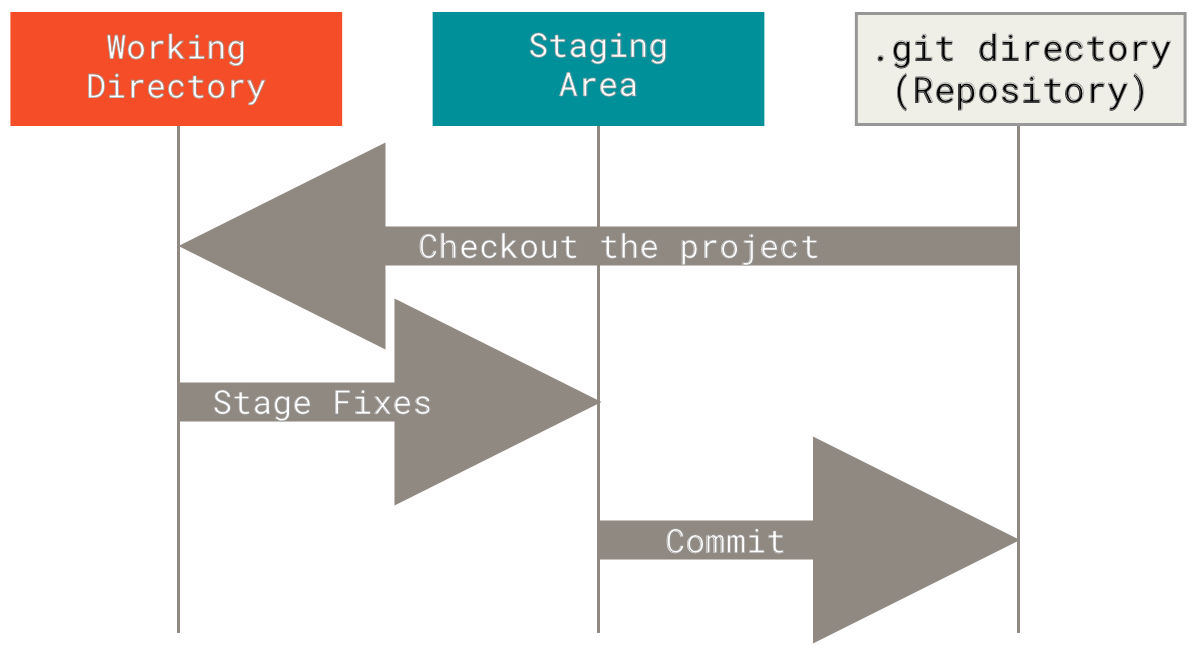 + + + +### Basic Git Commands +- `git init` - Initialize a new Git repository. +- `git clone` - Clone an existing repository. +- `git add` - Add files to the staging area. +- `git commit` - Commit changes to the repository. +- `git status` - Check the status of the repository. +- `git log` - View the commit history. +- `git branch` - List, create, or delete branches. +- `git checkout` - Switch between branches. +- `git merge` - Merge changes from one branch to another. +- `git pull` - Fetch and merge changes from a remote repository. +- `git push` - Push changes to a remote repository. + +### Git Branching +- Main Branch - The main branch is the default branch in a Git repository and contains the stable version of the code. +- Feature Branch - A feature branch is created to develop a new feature or fix a bug without affecting the main branch. +- Pull Request - A pull request is a request to merge changes from a feature branch into the main branch. +- Merge - Merging combines the changes from one branch into another branch. +- Conflict - A conflict occurs when Git cannot automatically merge changes and requires manual intervention. + +### Git Best Practices +- Use descriptive commit messages. +- Commit early and often. +- Keep commits focused on a single change. +- Use feature branches for new features or bug fixes. +- Review and test changes before merging. +- Resolve conflicts promptly. +- Keep the commit history clean and organized. + +### Getting Help + ## GitHub +GitHub is a web-based platform that hosts Git repositories and provides collaboration tools for developers. It allows developers to share code, track issues, and collaborate on projects with other developers. GitHub is widely used for open-source projects, team collaboration, and code hosting. + +### GitHub Features +- Repository - A repository is a collection of files and directories tracked by Git. +- Issues - Issues are used to track bugs, feature |