
diff options
| author | Christian Kolset <christian.kolset@gmail.com> | 2025-01-29 00:54:18 -0700 |
|---|---|---|
| committer | Christian Kolset <christian.kolset@gmail.com> | 2025-01-29 00:54:18 -0700 |
| commit | 9d37832b82d8f2b9d041503bb75b3370d9622100 (patch) | |
| tree | 5e0a550e10f2d341f1e174339148bc75300c94ce /tutorials | |
| parent | aaf05d4a14961883bc425c14f679c16737ecd1a4 (diff) | |
Added spacing between the numbering of the steps under Environment section
Diffstat (limited to 'tutorials')
| -rw-r--r-- | tutorials/1.2_intro_to_anaconda.md | 12 |
1 files changed, 7 insertions, 5 deletions
diff --git a/tutorials/1.2_intro_to_anaconda.md b/tutorials/1.2_intro_to_anaconda.md index 464be83..ae52c17 100644 --- a/tutorials/1.2_intro_to_anaconda.md +++ b/tutorials/1.2_intro_to_anaconda.md @@ -17,9 +17,9 @@ Once Navigator starts, under *Home*, you'll see tiles of programs that come with The *Environment* page allows us to install a variety of libraries and configure our environments for different project, more on this in the next section. ## Environments -A Python environment is like a "container" where you can have all the tools, libraries, and dependencies your Python project needs without interfering with other projects. Think of it as a toolbox dedicated to a specific task. +A Python environment is like a "container" where you can have all the tools, libraries, and dependencies your Python project needs without interfering with other projects. Think of it as a toolbox dedicated to a specific task. -Although the base environment comes with many libraries and programs pre-installed, it's recommended to create a dedicated environment for your projects. This protects the base environment from breaking due to complex dependency conflicts. Let us go ahead and create a new environment for us to use. +Although the base environment comes with many libraries and programs pre-installed, it's recommended to create a dedicated environment for your projects. This protects the base environment from breaking due to complex dependency conflicts. Let us go ahead and create a new environment for us to use. 1. Click on the *Environments* page located on the left hand side. @@ -28,15 +28,19 @@ Although the base environment comes with many libraries and programs pre-install 2. At the bottom of the environments list, click *Create*. 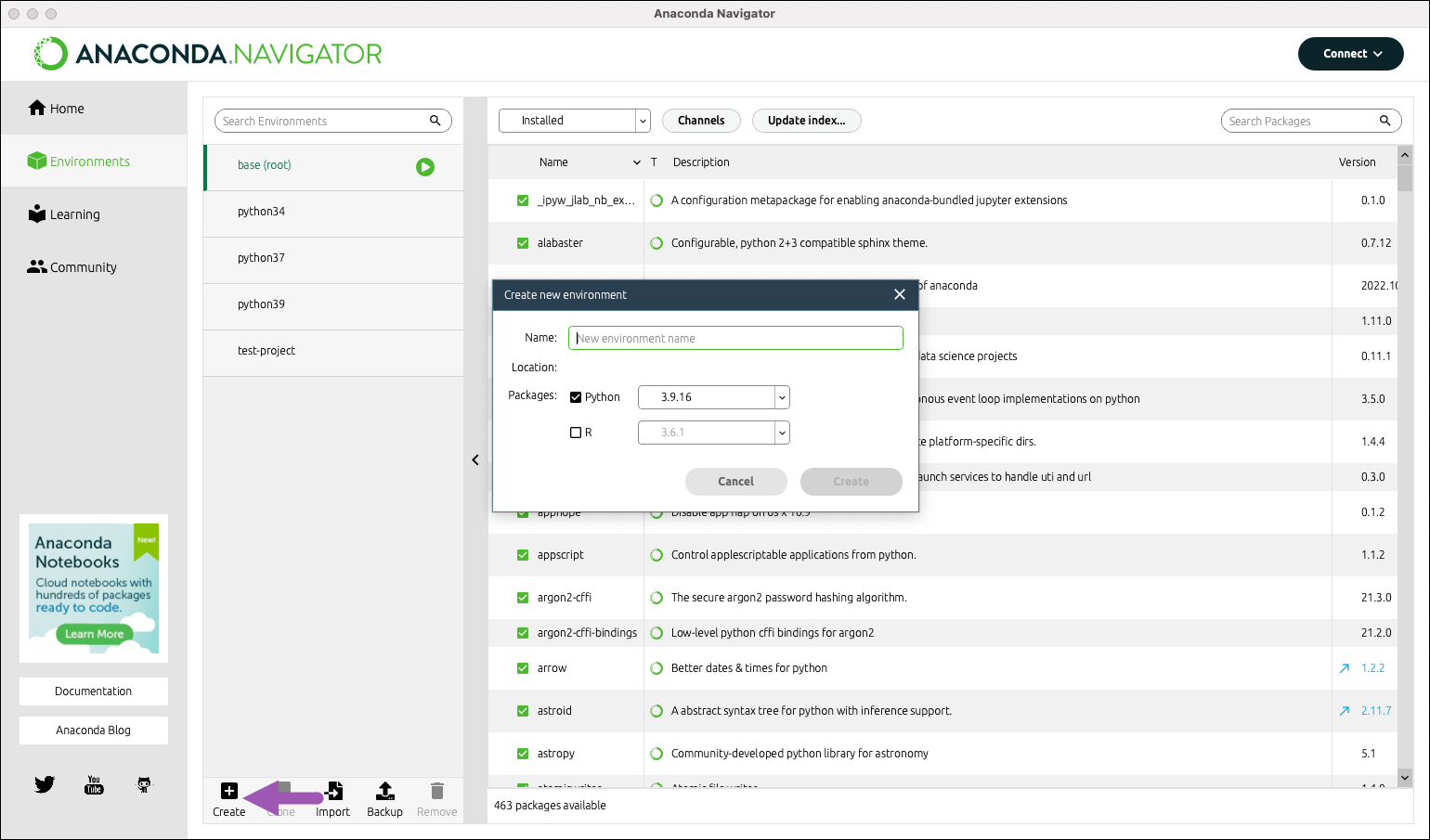 + 3. Select the python checkbox. + 4. Select versions of python. For this tutorial we will be using version 3.XX.X. + 5. Choose an appropriate name for your project. We will be creating an environment for Spyder IDE so we'll call it "spyder-dev". + 6. Click *Create*. For more information see [Anaconda Environments](https://docs.anaconda.com/working-with-conda/environments/) and [Managing environment](https://docs.anaconda.com/navigator/tutorials/manage-environments/). ## Package Management -Now that we have a clean environment let us install some library we will be using for this class. +Now that we have a clean environment let us install some library we will be using for this class. 1. Navigate to the environment page and select the environment we just created in the previous section. @@ -52,5 +56,3 @@ Now that we have a clean environment let us install some library we will be usin | matplotlib | Plots and visualizations | | sympy | Symbolic mathematics | | cython | Optimizing Python code and interfacing with C++ code | - - |