
diff options
| author | Christian Kolset <christian.kolset@gmail.com> | 2025-02-14 01:07:58 -0700 |
|---|---|---|
| committer | Christian Kolset <christian.kolset@gmail.com> | 2025-02-14 01:07:58 -0700 |
| commit | a436e8517853231126bdb6825a98980d083cc14e (patch) | |
| tree | b58653969e9a8937ac95586bac94e6e9e40a46f9 /tutorials | |
| parent | d6f14bd75a694c1b6ed30e3ec2482503e656857e (diff) | |
Updated tutorials
Diffstat (limited to 'tutorials')
| -rw-r--r-- | tutorials/1_03_intro_to_anaconda.md | 17 | ||||
| -rw-r--r-- | tutorials/1_04_spyder_getting_started.md | 2 | ||||
| -rw-r--r-- | tutorials/2_version_control.md | 9 | ||||
| -rw-r--r-- | tutorials/readme.md | 6 |
4 files changed, 23 insertions, 11 deletions
diff --git a/tutorials/1_03_intro_to_anaconda.md b/tutorials/1_03_intro_to_anaconda.md index f53699f..543239e 100644 --- a/tutorials/1_03_intro_to_anaconda.md +++ b/tutorials/1_03_intro_to_anaconda.md @@ -9,7 +9,7 @@ The Anaconda website nicely describes *Navigator* as: To better understand how Navigator works and interacts with the anaconda ecosystem see the figure below.  -Navigator +As you schematic indicated, Navigator is a tool in the Anaconda toolbox that allows the user to select and configure python environments and libraries. Let's see how we can do this. --- ## Getting Started @@ -63,4 +63,17 @@ Now that we have a clean environment configured, let us install some library we | sympy | Symbolic mathematics | *Note: The libraries list may change throughout the development of this course* -Once you've +3. Check the boxes to install the selected packages to the current environment. + +## Installing Applications +From the *Home* page you can install applications, to the current environment we created in the Environment section above. In this section we will install Spyder IDE, but the process is exactly the same for other applications. + +1. Go to the *Home* page. + +2. Select the desired environment. In our case, we select Spyder-dev. + +3. From the Home page find the Spyder IDE tile. Click the *Install* button to start the download. + +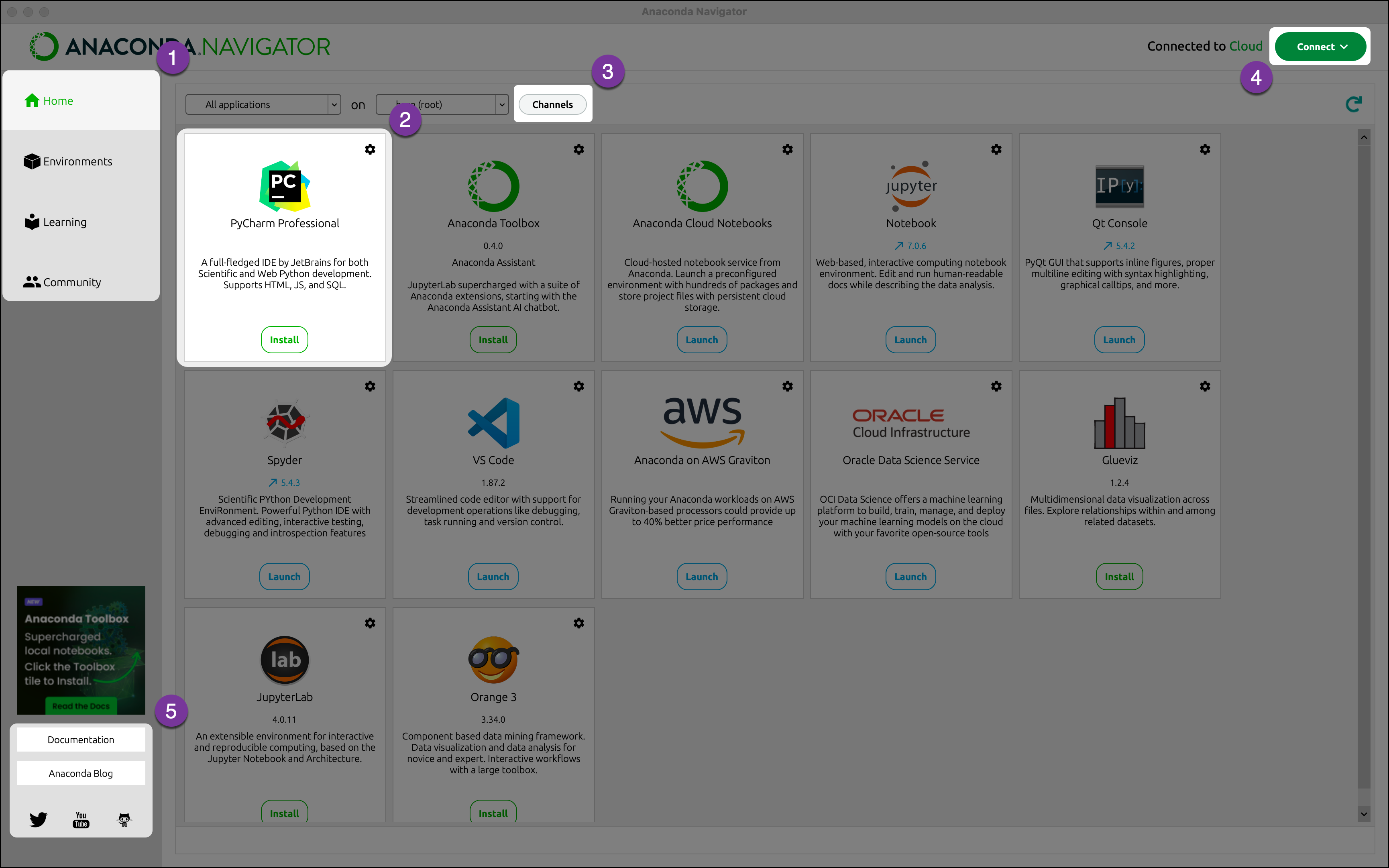 + +4. Once the download is complete, press *Launch* to start the applications.
\ No newline at end of file diff --git a/tutorials/1_04_spyder_getting_started.md b/tutorials/1_04_spyder_getting_started.md index 03b7fd3..08cbde9 100644 --- a/tutorials/1_04_spyder_getting_started.md +++ b/tutorials/1_04_spyder_getting_started.md @@ -9,7 +9,7 @@ Using Anaconda we will select the environment we created earlier *spyder-dev*. ## Spyder Interface - +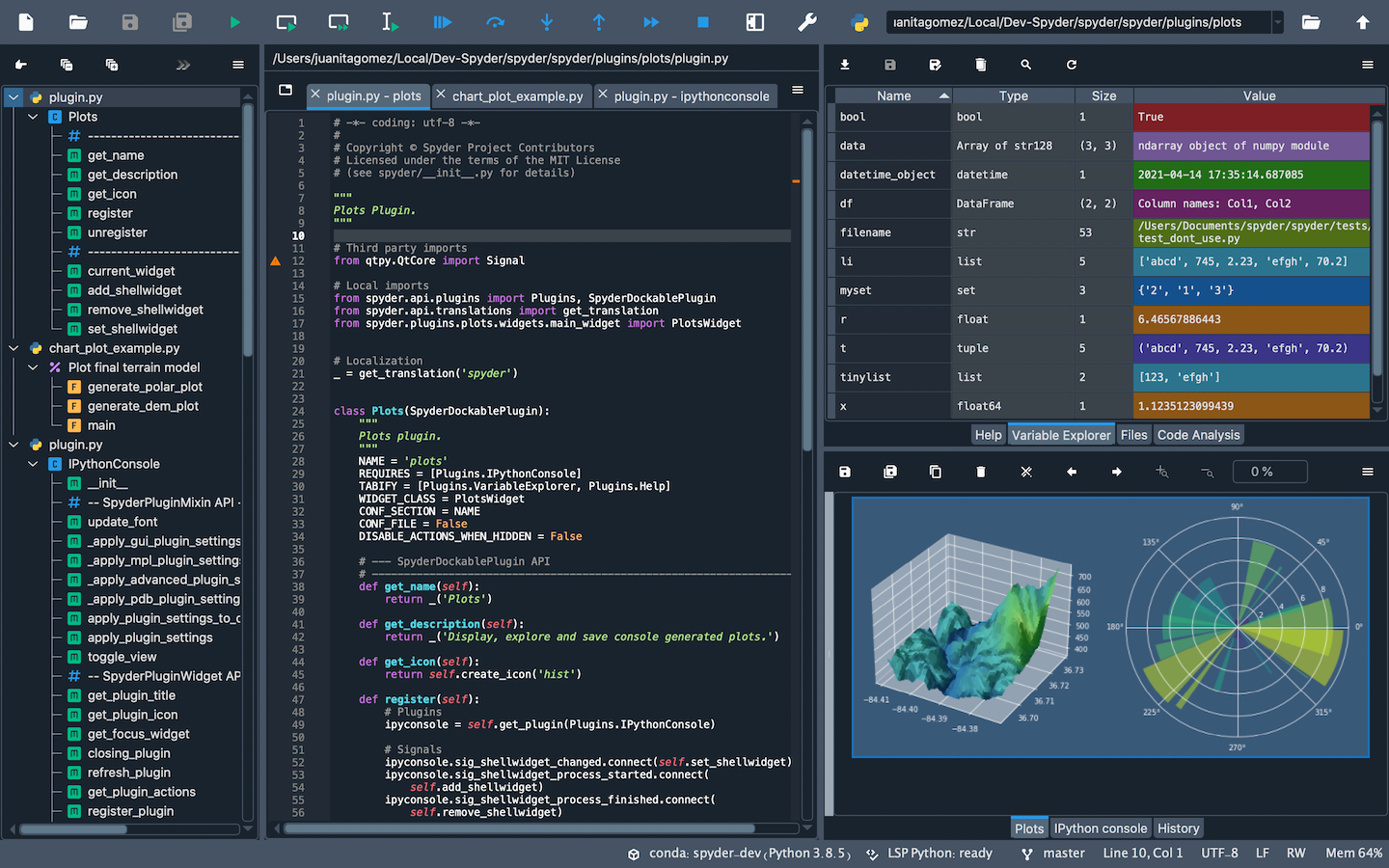 Once you open up Spyder in it's default configuration, you'll see three sections; the editor IPython Console, Help viewer. You can customize the interface to suit your prefference and needs some of which include, rearrange, undock, hide panes. Feel free to set up Spyder as you like. diff --git a/tutorials/2_version_control.md b/tutorials/2_version_control.md index f9719e1..5a28715 100644 --- a/tutorials/2_version_control.md +++ b/tutorials/2_version_control.md @@ -4,11 +4,10 @@ Version control is a system that tracks changes to files, enabling developers to collaborate, manage code history, and revert to previous versions when needed. Why use it you may ask? - - - Tracks changes and history. - - Enables collaboration among developers. - - Reduces errors by managing code versions. - - Supports branching and merging for parallel development. +- Tracks changes and history. +- Enables collaboration among developers. +- Reduces errors by managing code versions. +- Supports branching and merging for parallel development. ## Git Git is a version control program that allows diff --git a/tutorials/readme.md b/tutorials/readme.md index c96b323..6f3fa54 100644 --- a/tutorials/readme.md +++ b/tutorials/readme.md @@ -19,8 +19,8 @@ This directory contains all the tutorials. ### Algorithm Developments for ME -- [Introduction to Numerical Methods](intro_to_numerical_methods.md) \[Started\] -- [Version Control](version_control.md) +- [Introduction to Numerical Methods](2_01_intro_to_numerical_methods.md) \[Started\] +- [Version Control](2_version_control.md) - Roots and Optimization - Systems of Equations and LU Decomposition - Linear Regression @@ -29,4 +29,4 @@ This directory contains all the tutorials. ### Applications of Computational Mathematics in ME ### Data Analysis of Processing -- [Plotting](plotting.md)
\ No newline at end of file +- [Plotting](4_plotting.md)
\ No newline at end of file |