
diff options
Diffstat (limited to 'tutorials/module_2/notebook_2/version_control.ipynb')
| -rw-r--r-- | tutorials/module_2/notebook_2/version_control.ipynb | 183 |
1 files changed, 183 insertions, 0 deletions
diff --git a/tutorials/module_2/notebook_2/version_control.ipynb b/tutorials/module_2/notebook_2/version_control.ipynb new file mode 100644 index 0000000..df3aa5a --- /dev/null +++ b/tutorials/module_2/notebook_2/version_control.ipynb @@ -0,0 +1,183 @@ +{ + "cells": [ + { + "cell_type": "markdown", + "id": "1e82f8c5-1fb7-4e4d-b20c-c0be1e1e9f5b", + "metadata": {}, + "source": [ + "# Version Control Software\n", + "\n", + "## What is Version Control\n", + "\n", + "Version control is a system that tracks changes to files, enabling\n", + "developers to collaborate, manage code history, and revert to previous\n", + "versions when needed. The most used version control software (VCS) is\n", + "git. In this course git is the VCS we will be using.\n", + "\n", + "In the open-source community VCS is the - Tracks changes and history. -\n", + "Enables collaboration among developers. - Reduces errors by managing\n", + "code versions. - Supports branching and merging for parallel\n", + "development.\n", + "\n", + "In this section is divided up into two major sections. The first section\n", + "*Git* will cover the basics of how to create backups of your project.\n", + "The second section will cover how to use git with GitHub to\n", + "*collaborate* on projects.\n", + "\n", + "------------------------------------------------------------------------\n", + "\n", + "## Git\n", + "\n", + "Git is a version control program that tracks changes to files and\n", + "directories using snapshots. It is a distributed version control system,\n", + "meaning that each developer has a complete copy of the repository on\n", + "their local computer. Git is the most widely used version control system\n", + "and is popular among developers for its speed, flexibility, and\n", + "efficiency.\n", + "\n", + "### The Three States\n", + "\n", + "Pay attention now — here is the main thing to remember about Git if you\n", + "want the rest of your learning process to go smoothly. Git has three\n", + "main states that your files can reside in: modified, staged, and\n", + "committed:\n", + "\n", + "- **Modified** means that you have changed the file but have not\n", + " committed it to your database yet.\n", + "- **Staged** means that you have marked a modified file in its current\n", + " version to go into your next commit snapshot.\n", + "- **Committed** means that the data is safely stored in your local\n", + " database.\n", + "\n", + "This leads us to the three main sections of a Git project: the working\n", + "tree, the staging area, and the Git directory.\n", + "\n", + "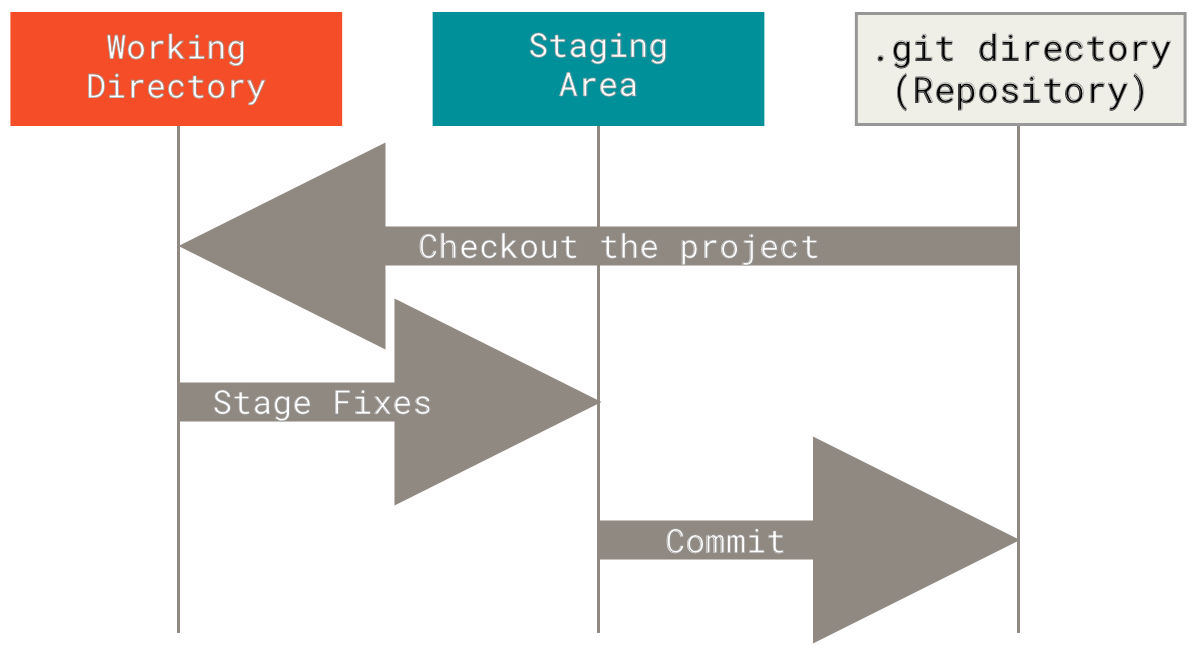\n", + "\\### Branching In git, branches allow for parallel workflow on a\n", + "project. It give contributors the ability to work different features at\n", + "the same time. Each branch represents an independent line of\n", + "development, and once a feature or fix is complete, it can be merged\n", + "back into the main branch. Here is a common branching structure used in\n", + "many Git projects: - Main Branch - The main branch (a.k.a. master\n", + "branch) is the default branch in a Git repository and contains the\n", + "stable version of the code. - Development Branch - is created to develop\n", + "a new feature or fix a bug without affecting the main branch. It isn’t\n", + "necessarily always stable, but whenever it gets to a stable state, it\n", + "can be merged into master. - Topic Branch - A topic branch is a\n", + "short-lived branch that you create and use for a single particular\n", + "feature or related work. 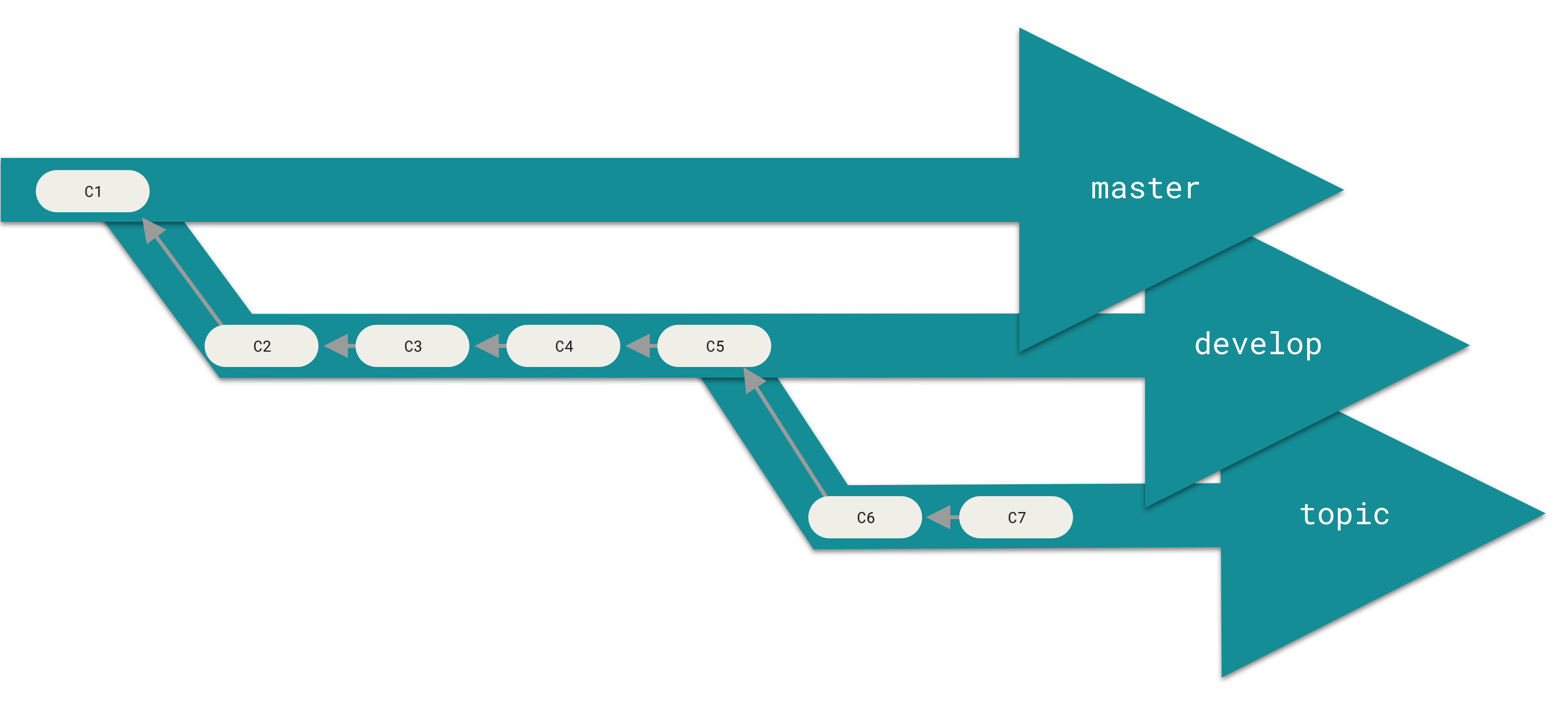 \\###\n", + "Best Practices - Use descriptive commit messages. - Commit early and\n", + "often. - Keep commits focused on a single change. - Use feature branches\n", + "for new features or bug fixes. - Review and test changes before\n", + "merging. - Resolve conflicts promptly. - Keep the commit history clean\n", + "and organized.\n", + "\n", + "### Basic Commands\n", + "\n", + "Here is a list of some git commands to get you started. \\#### Starting\n", + "your repository - `git init` - Initialize a new Git repository. -\n", + "`git clone` - Clone an existing repository. \\#### Committing -\n", + "`git status` - Check the status of the repository. - `git add` - Add\n", + "files to the staging area. - `git commit` - Commit changes to the\n", + "repository. \\#### Branching - `git branch` - List, create, or delete\n", + "branches. - `git checkout` - Switch between branches. \\####\n", + "History/Inspection - `git log` - View the commit history. \\####\n", + "Collaborative - `git fetch` - Fetches updates from a remote but does not\n", + "merge. - `git merge` - Merge changes from a named commit to the current\n", + "branch. - `git pull` - Fetch and merge changes from a remote\n", + "repository. - `git push` - Push changes to a remote repository.\n", + "\n", + "### More on git\n", + "\n", + "Interested in learning more about git? Here’s a free book that teaches\n", + "you everything about git and how to use it at a professional level.\n", + "Available as both HTML and PDF download: [Git\n", + "Pro](https://git-scm.com/book/en/v2).\n", + "\n", + "## GitHub - The collaborative platform\n", + "\n", + "GitHub is a web-based platform that hosts Git repositories and provides\n", + "collaboration tools for developers. It allows developers to share code,\n", + "track issues, and collaborate on projects with other developers. GitHub\n", + "is widely used for open-source projects, team collaboration, and code\n", + "hosting. \\### GitHub Features - Remote Repository Hosting - GitHub\n", + "allows you to host projects and code remotely on their servers. -\n", + "Issues - Issues are used to track bugs, feature - Pull Requests -\n", + "Internal request system for contributors to request code to be pulled.\n", + "\\### Workflow Depending on the size of the project and whether the\n", + "project is closed- or open-source, the workflow of the project will\n", + "differ. In this section we cover some git workflow models and the model\n", + "you’re going to be using for this course.\n", + "\n", + "**Centralized**: The project has only one central hub or *repository*,\n", + "can accept code and everybody synchronizes their work with it. This\n", + "model is suitable for small and closed-sourced projects. 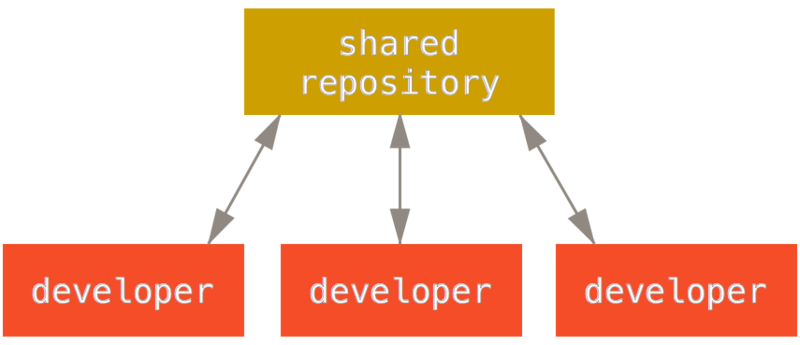\n", + "\n", + "**Integration-Manager:** There are multiple public variants of the code\n", + "original code known as *forks*. The integration manager can decide what\n", + "features to pull from the forks. This is the model that is similar to\n", + "the one used on GitHub 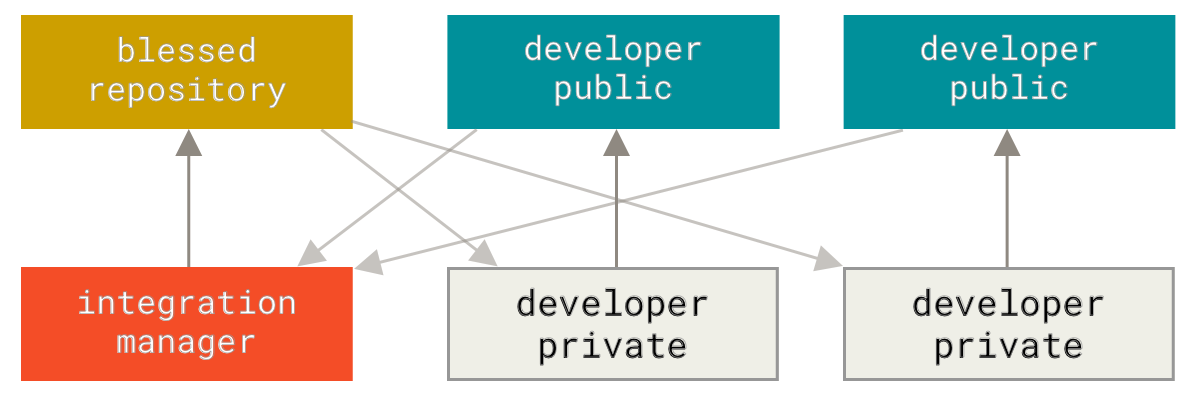\n", + "\n", + "**Dictator and Lieutenants Workflow:** This is similar to the\n", + "integration-manager model, however due to the size of the project. A\n", + "rank of integration managers is formed. one example of this is the\n", + "development of the Linux kernel. 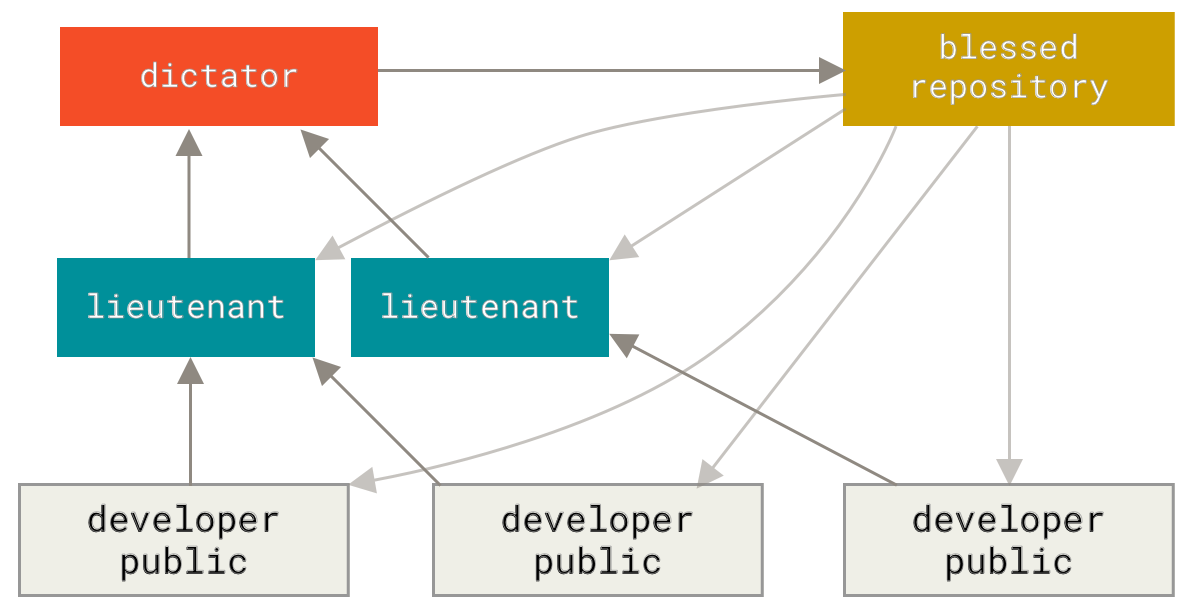\n", + "\n", + "GitHub is designed around a particular collaboration workflow, centered\n", + "on Pull Requests. This flow works whether you’re collaborating with a\n", + "tightly-knit team in a single shared repository, or a\n", + "globally-distributed company or network of strangers contributing to a\n", + "project through dozens of forks. It is centered on the Topic Branches\n", + "workflow covered in Git Branching.\n", + "\n", + "Here’s how it generally works: 1. Fork the project. 2. Create a topic\n", + "branch from master. 3. Make some commits to improve the project. 4. Push\n", + "this branch to your GitHub project. 5. Open a Pull Request on GitHub. 6.\n", + "Discuss, and optionally continue committing. 7. The project owner merges\n", + "or closes the Pull Request. 8. Sync the updated master back to your\n", + "fork.\n", + "\n", + "### Terms\n", + "\n", + "- Pull Request - A *pull request* is a request to merge changes from a\n", + " feature branch into the main branch or from a forked repository to\n", + " the original or “upstream” repository.\n", + "- Merge - A *merge* combines the changes from one branch into another\n", + " branch.\n", + "- Conflict - A *conflict* occurs when Git cannot automatically merge\n", + " changes and requires manual intervention.\n", + "\n", + "### Code resource - Using GitHub to re-use existing code.\n", + "\n", + "In your engineering career, you will most likely use a computation\n", + "method that has been come up with before. In such scenarios, open-source" + ] + } + ], + "metadata": { + "kernelspec": { + "display_name": "Python 3 (ipykernel)", + "language": "python", + "name": "python3" + }, + "language_info": { + "codemirror_mode": { + "name": "ipython", + "version": 3 + }, + "file_extension": ".py", + "mimetype": "text/x-python", + "name": "python", + "nbconvert_exporter": "python", + "pygments_lexer": "ipython3", + "version": "3.13.2" + } + }, + "nbformat": 4, + "nbformat_minor": 5 +} |