
diff options
Diffstat (limited to 'tutorials/module_4/4.3 Importing and Managing Data.md')
| -rw-r--r-- | tutorials/module_4/4.3 Importing and Managing Data.md | 142 |
1 files changed, 142 insertions, 0 deletions
diff --git a/tutorials/module_4/4.3 Importing and Managing Data.md b/tutorials/module_4/4.3 Importing and Managing Data.md new file mode 100644 index 0000000..101d5ab --- /dev/null +++ b/tutorials/module_4/4.3 Importing and Managing Data.md @@ -0,0 +1,142 @@ +# Importing and Managing Data + +**Learning objectives:** + +- Import data from CSV, Excel, and text files using Pandas +- Handle headers, delimiters, and units +- Combine and merge multiple datasets +- Manage data with time or index labels +--- +## File types +Once data is collected, the first step is importing it into a structured form that Python can interpret. The `pandas` library provides the foundation for this, it can read nearly any file format used in engineering (text files, CSV, Excel sheets, CFD results, etc. as well as many python formats such as, arrays, lists, dicitonaries, Numpy arrays etc.) and organize the data in a DataFrame, a tabular structure similar to an Excel sheet but optimized for coding. +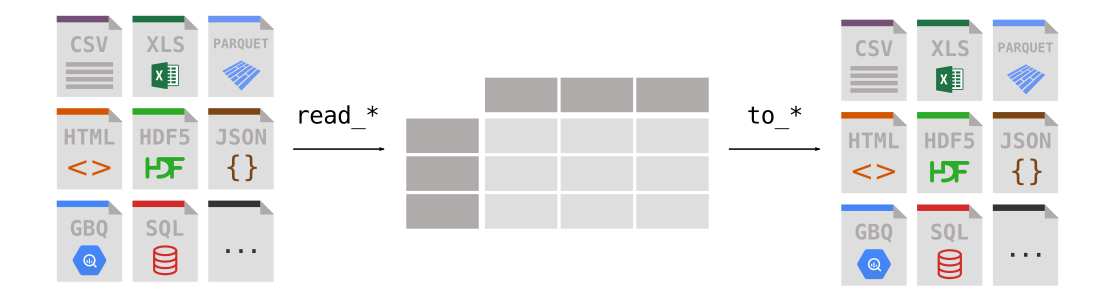 +## Importing spreadsheets using Pandas +Comma-Separated Values (CSV) files is a common spreadsheet type file. It is essentially a text file where each line is a now row of tables and commas indicate that a new column has stated. It is a standard convention to save spreadsheets in this format. + +Let's take a look at how this works in python. +```python +import pandas as pd + +# Read a CSV file +df = pd.read_csv("data_experiment.csv") + +# Optional arguments +df_csv = pd.read_csv( + "data_experiment.csv", + delimiter=",", # specify custom delimiter + header=0, # row number to use as header + index_col=None, # or specify a column as index + skiprows=0, # skip metadata lines +) +print df +``` + +We now created a new dataframe with the data from our .csv file. + +We can also do this for **excel files**. Pandas has a built-in function to make this easier for us. +```python +df_xlsx = pd.read_excel("temperature_log.xlsx", sheet_name="Sheet1") +print(df_xlsx.head()) +``` + +Additionally, although not a very common practice in engineering but very useful: Pandas can import a wide variety of file types such as JSON, HTML, SQL or even your clipboard. + +### Handling Headers, Units, and Metadata +Raw data often contains metadata or units above the table. Pandas can account for this metadata by skipping the first few rows. + +```python +df = pd.read_csv("sensor_data.csv", skiprows=3) +df.columns = ["Time_s", "Force_N", "Displacement_mm"] + +# Convert units +df["Displacement_m"] = df["Displacement_mm"] / 1000 +``` + +### Writing and Editing Data in pandas +https://pandas.pydata.org/docs/getting_started/intro_tutorials/02_read_write.html + +Once data has been analyzed or cleaned, `pandas` allows you to **export results** to multiple file types for reporting or further processing. Similarily to importing we can also export .csv files and Excel files. Pandas makes it easy to modify individual datapoints directly within a DataFrame. You can localize entries either by label or position + +```python +# by name +df.loc[row_label, column_label]` +#or by position +df.iloc[row_index, column_index] +``` + + +```python +import pandas as pd + +# Create DataFrame manually +data = { + "Time_s": [0, 1, 2, 3], + "Force_N": [0.0, 5.2, 10.4, 15.5], + "Displacement_mm": [0.0, 0.3, 0.6, 0.9] +} +df = pd.DataFrame(data) + +# Edit a single value +df.loc[1, "Force_N"] = 5.5 + +# Export to CSV +df.to_csv("edited_experiment.csv", index=False) +``` + +This workflow makes pandas ideal for working with tabular data, you can quickly edit or generate datasets, verify values, and save clean, structured files for later visualization or analysis. + +## Subsetting and Conditional filtering +You can select rows, columns, or specific conditions from a DataFrame. + +```python +# Select a column +force = df["Force_N"] + +# Select multiple columns +subset = df[["Time_s", "Force_N"]] + +# Conditional filtering +df_high_force = df[df["Force_N"] > 50] +``` + + +![[Pasted image 20251013064718.png]] + +## Combining and Merging Datasets +Often, multiple sensors or experiments must be merged into one dataset for analysis. + +```python +# Merge on a common column (e.g., time) +merged = pd.merge(df_force, df_temp, on="Time_s") + +# Stack multiple test runs vertically +combined = pd.concat([df_run1, df_run2], axis=0) +``` + + +## Problem 1: Describe a dataset +Use pandas built-in describe data to report on the statistical mean of the given experimental data. + +```python +import matplotlib.pyplot as plt + +plt.plot(df["Time_s"], df["Force_N"]) +plt.xlabel("Time (s)") +plt.ylabel("Force (N)") +plt.title("Force vs. Time") +plt.show() +``` + + +### Problem 2: Import time stamped data + + + +### Further Docs +[Comparison with Spreadsheets](https://pandas.pydata.org/docs/getting_started/comparison/comparison_with_spreadsheets.html#compare-with-spreadsheets) +[Intro to Reading/Writing Files](https://pandas.pydata.org/docs/getting_started/intro_tutorials/02_read_write.html) +[Subsetting Data](https://pandas.pydata.org/docs/getting_started/intro_tutorials/03_subset_data.html) +[Adding Columns](https://pandas.pydata.org/docs/getting_started/intro_tutorials/05_add_columns.html) +[Reshaping Data](https://pandas.pydata.org/docs/user_guide/reshaping.html) +[Merging DataFrames](https://pandas.pydata.org/docs/user_guide/merging.html) +[Combining DataFrames](https://pandas.pydata.org/docs/getting_started/intro_tutorials/08_combine_dataframes.html) |