
diff options
| author | Christian Kolset <christian.kolset@gmail.com> | 2025-03-19 17:27:08 -0600 |
|---|---|---|
| committer | Christian Kolset <christian.kolset@gmail.com> | 2025-03-19 17:27:08 -0600 |
| commit | 02b0fe182dadd5a8cbfa0f62375290e3459eac52 (patch) | |
| tree | 5f3adeed9c2afe9e4228d6687ca85e8a1aa5dc85 /tutorials/module_2 | |
| parent | fee2d13efb03032572c8e509b6321c8521b6dfa9 (diff) | |
Finished off the first revision of VCS
Diffstat (limited to 'tutorials/module_2')
| -rw-r--r-- | tutorials/module_2/2_version_control.md | 96 |
1 files changed, 67 insertions, 29 deletions
diff --git a/tutorials/module_2/2_version_control.md b/tutorials/module_2/2_version_control.md index 280e7f5..a5998b1 100644 --- a/tutorials/module_2/2_version_control.md +++ b/tutorials/module_2/2_version_control.md @@ -1,14 +1,17 @@ -# Version Control +# Version Control Software ## What is Version Control -Version control is a system that tracks changes to files, enabling developers to collaborate, manage code history, and revert to previous versions when needed. +Version control is a system that tracks changes to files, enabling developers to collaborate, manage code history, and revert to previous versions when needed. The most used version control software (VCS) is git. In this course git is the VCS we will be using. -Why use it? +In the open-source community VCS is the - Tracks changes and history. - Enables collaboration among developers. - Reduces errors by managing code versions. - Supports branching and merging for parallel development. +In this section is divided up into two major sections. The first section *Git* will cover the basics of how to create backups of your project. The second section will cover how to use git with GitHub to *collaborate* on projects. + +--- ## Git Git is a version control program that tracks changes to files and directories using snapshots. It is a distributed version control system, meaning that each developer has a complete copy of the repository on their local computer. Git is the most widely used version control system and is popular among developers for its speed, flexibility, and efficiency. @@ -22,44 +25,79 @@ Pay attention now — here is the main thing to remember about Git if you want t This leads us to the three main sections of a Git project: the working tree, the staging area, and the Git directory. 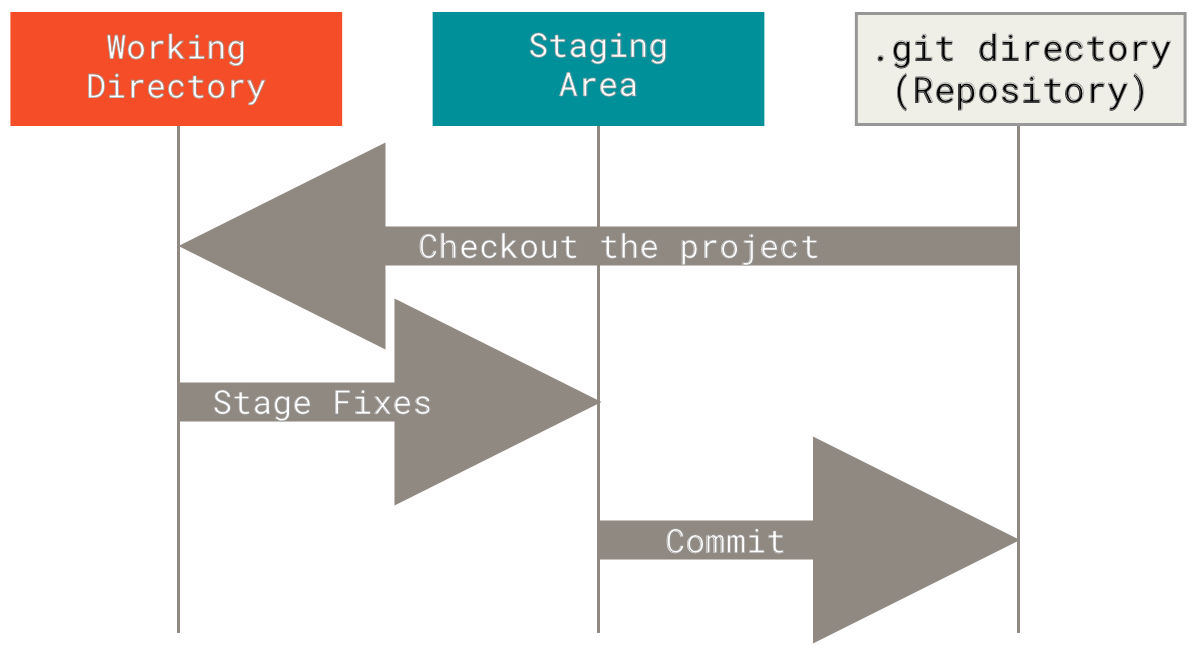 +### Branching +In git, branches allow for parallel workflow on a project. It give contributors the ability to work different features at the same time. Each branch represents an independent line of development, and once a feature or fix is complete, it can be merged back into the main branch. Here is a common branching structure used in many Git projects: +- Main Branch - The main branch (a.k.a. master branch) is the default branch in a Git repository and contains the stable version of the code. +- Development Branch - is created to develop a new feature or fix a bug without affecting the main branch. It isn’t necessarily always stable, but whenever it gets to a stable state, it can be merged into master. +- Topic Branch - A topic branch is a short-lived branch that you create and use for a single particular feature or related work. +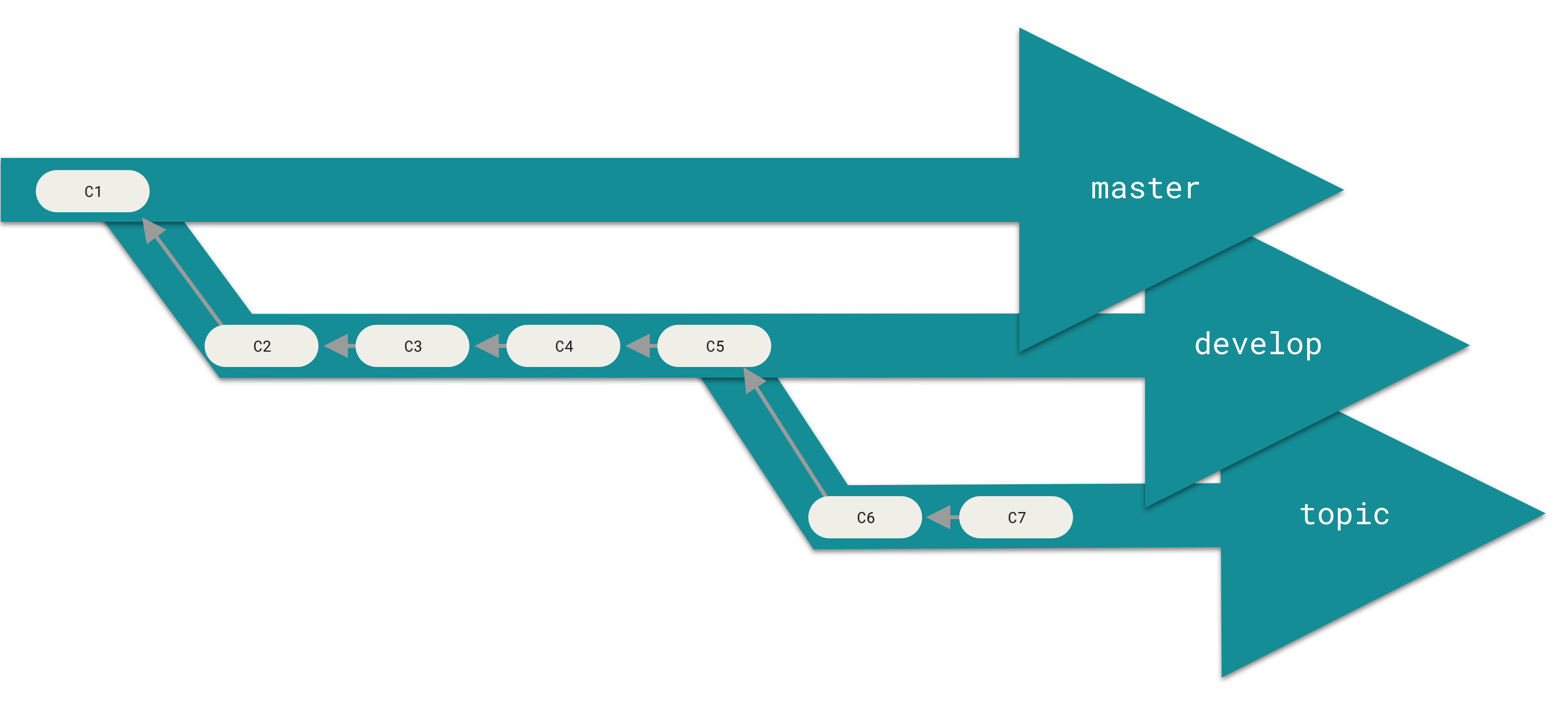 +### Best Practices +- Use descriptive commit messages. +- Commit early and often. +- Keep commits focused on a single change. +- Use feature branches for new features or bug fixes. +- Review and test changes before merging. +- Resolve conflicts promptly. +- Keep the commit history clean and organized. - - -### Basic Git Commands +### Basic Commands +Here is a list of some git commands to get you started. +#### Starting your repository - `git init` - Initialize a new Git repository. - `git clone` - Clone an existing repository. +#### Committing +- `git status` - Check the status of the repository. - `git add` - Add files to the staging area. - `git commit` - Commit changes to the repository. -- `git status` - Check the status of the repository. -- `git log` - View the commit history. +#### Branching - `git branch` - List, create, or delete branches. - `git checkout` - Switch between branches. -- `git merge` - Merge changes from one branch to another. +#### History/Inspection +- `git log` - View the commit history. +#### Collaborative +- `git fetch` - Fetches updates from a remote but does not merge. +- `git merge` - Merge changes from a named commit to the current branch. - `git pull` - Fetch and merge changes from a remote repository. - `git push` - Push changes to a remote repository. -### Git Branching -- Main Branch - The main branch is the default branch in a Git repository and contains the stable version of the code. -- Feature Branch - A feature branch is created to develop a new feature or fix a bug without affecting the main branch. -- Pull Request - A pull request is a request to merge changes from a feature branch into the main branch. -- Merge - Merging combines the changes from one branch into another branch. -- Conflict - A conflict occurs when Git cannot automatically merge changes and requires manual intervention. +### More on git +Interested in learning more about git? Here's a free book that teaches you everything about git and how to use it at a professional level. Available as both HTML and PDF download: [Git Pro](https://git-scm.com/book/en/v2). -### Git Best Practices -- Use descriptive commit messages. -- Commit early and often. -- Keep commits focused on a single change. -- Use feature branches for new features or bug fixes. -- Review and test changes before merging. -- Resolve conflicts promptly. -- Keep the commit history clean and organized. +## GitHub - Collaborative Projects +GitHub is a web-based platform that hosts Git repositories and provides collaboration tools for developers. It allows developers to share code, track issues, and collaborate on projects with other developers. GitHub is widely used for open-source projects, team collaboration, and code hosting. +### GitHub Features +- Remote Repository Hosting - GitHub allows you to host projects and code remotely on their servers. +- Issues - Issues are used to track bugs, feature +- Pull Requests - Internal request system for contributors to request code to be pulled. +### Workflow +Depending on the size of the project and whether the project is closed- or open-source, the workflow of the project will differ. In this section we cover some git workflow models and the model you're going to be using for this course. -### Getting Help +**Centralized**: The project has only one central hub or *repository*, can accept code and everybody synchronizes their work with it. This model is suitable for small and closed-sourced projects. +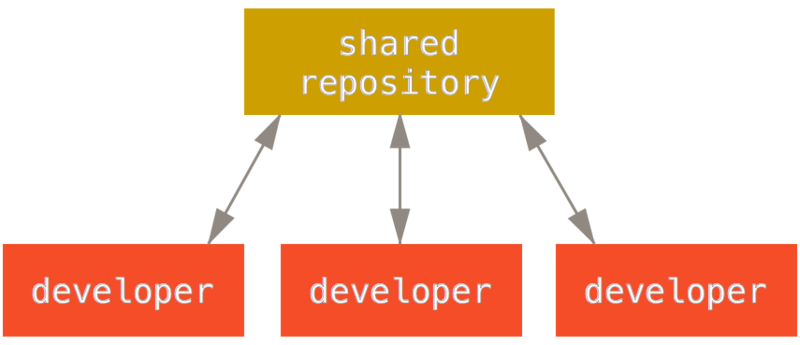 -## GitHub -GitHub is a web-based platform that hosts Git repositories and provides collaboration tools for developers. It allows developers to share code, track issues, and collaborate on projects with other developers. GitHub is widely used for open-source projects, team collaboration, and code hosting. +**Integration-Manager:** There are multiple public variants of the code original code known as *forks*. The integration manager can decide what features to pull from the forks. This is the model that is similar to the one used on GitHub +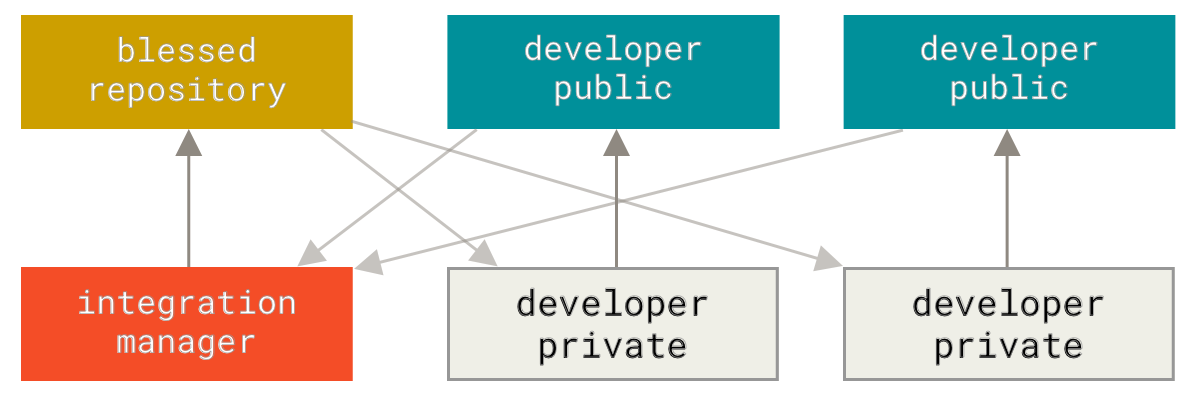 + + +**Dictator and Lieutenants Workflow:** This is similar to the integration-manager model, however due to the size of the project. A rank of integration managers is formed. one example of this is the development of the Linux kernel. +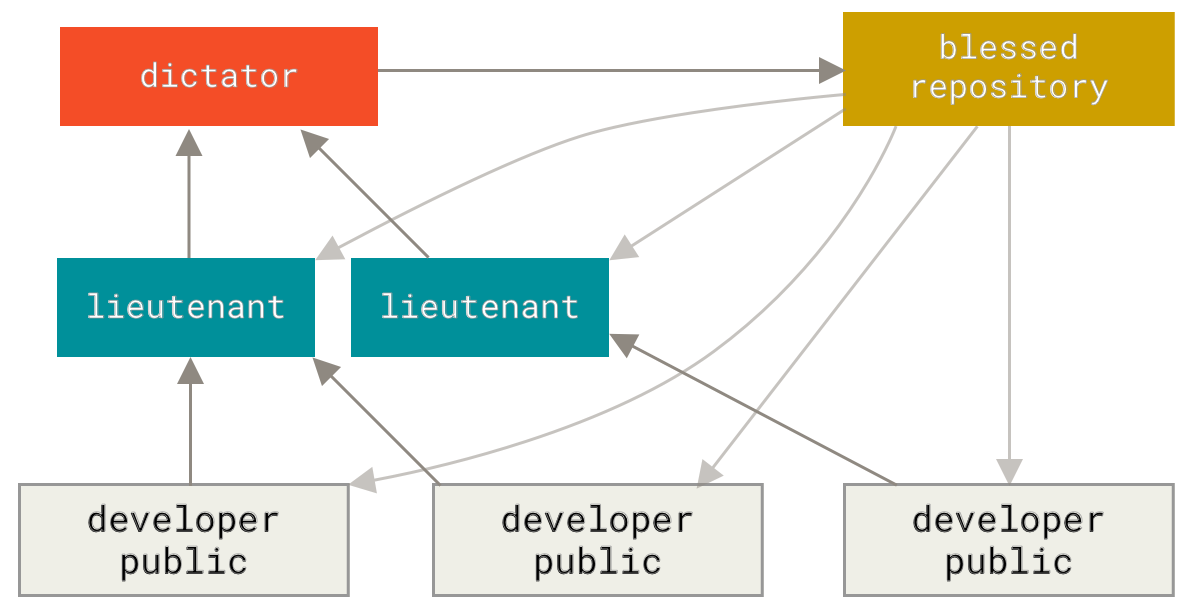 + + +GitHub is designed around a particular collaboration workflow, centered on Pull Requests. This flow works whether you’re collaborating with a tightly-knit team in a single shared repository, or a globally-distributed company or network of strangers contributing to a project through dozens of forks. It is centered on the Topic Branches workflow covered in Git Branching. + +Here’s how it generally works: +1. Fork the project. +2. Create a topic branch from master. +3. Make some commits to improve the project. +4. Push this branch to your GitHub project. +5. Open a Pull Request on GitHub. +6. Discuss, and optionally continue committing. +7. The project owner merges or closes the Pull Request. +8. Sync the updated master back to your fork. + +### Terms +- Pull Request - A pull request is a request to merge changes from a feature branch into the main branch. +- Merge - Merging combines the changes from one branch into another branch. +- Conflict - A conflict occurs when Git cannot automatically merge changes and requires manual intervention. -### GitHub Features -- Repository - A repository is a collection of files and directories tracked by Git. -- Issues - Issues are used to track bugs, feature |